Using Wiggle
Power Up and Power Down events
Octopus sometimes asks homes to use more or less electricity for a short time, and pays Octopoints for it. Wiggle tells you about these events and lets you join them.
Before you can join
- Sign up to Saving Sessions in the Octopus app, on this home's meter. Wiggle cannot do this for you.
- Connect Octopus, with Allow changes in Octopus turned on. Only an owner can turn this on.
Join an event
- Open the event from its notification or the card on Home. You can also open Settings, then Connections, then Octopus events.
- Select Join. You can do this until the event starts.
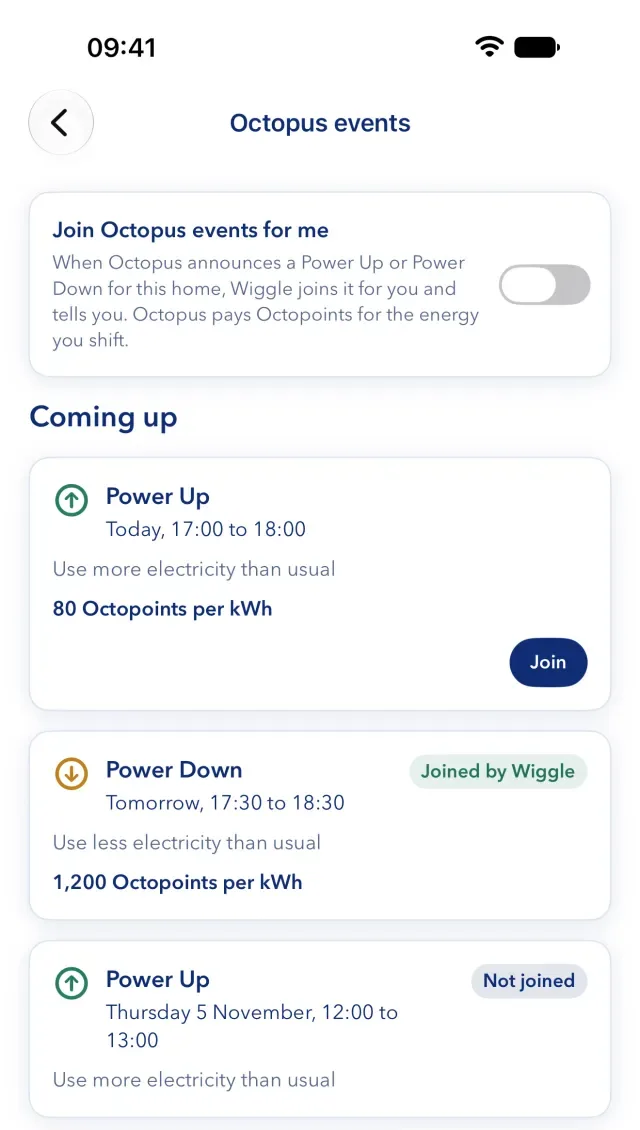
Octopus usually announces Power Up events at about 10:00 on the day. Wiggle checks often around that time, and hourly at other times. If you want a notification, turn on Worth acting on.
Let Wiggle join for you
In Octopus events, you can turn on "Join Octopus events for me". If you turn it on, Wiggle joins each event that Octopus announces for this home, and tells you. It is off at first, and it applies to the whole home. Any member can change it.
What you see
- Coming up. The event's name, time, what Octopus asks you to do and the Octopoints per kWh.
- Status. Joined, Joined by Wiggle or Not joined.
- Past events. After a joined event, Wiggle shows the Octopoints you earned and the energy that Octopus counted, when Octopus posts them. Past events stay listed for 90 days.
- Timeline. The event appears as a band on the chart.
If you cannot join
- "Sign up to Saving Sessions in the Octopus app…". Do this, then come back.
- "Octopus has Saving Sessions on another home's meter…". Ask Octopus to move it to this home's meter.
- "An owner of this home must first allow Wiggle to join Octopus events." Ask an owner to allow changes in Octopus.
- "This event has started, so it can no longer be joined." You can join only before an event starts.
- "Wiggle could not join this event." Try again, or join it in the Octopus app.
Still stuck?
Email support@wiggle.energy, or use Report an issue in the app. We aim to reply within one working day.